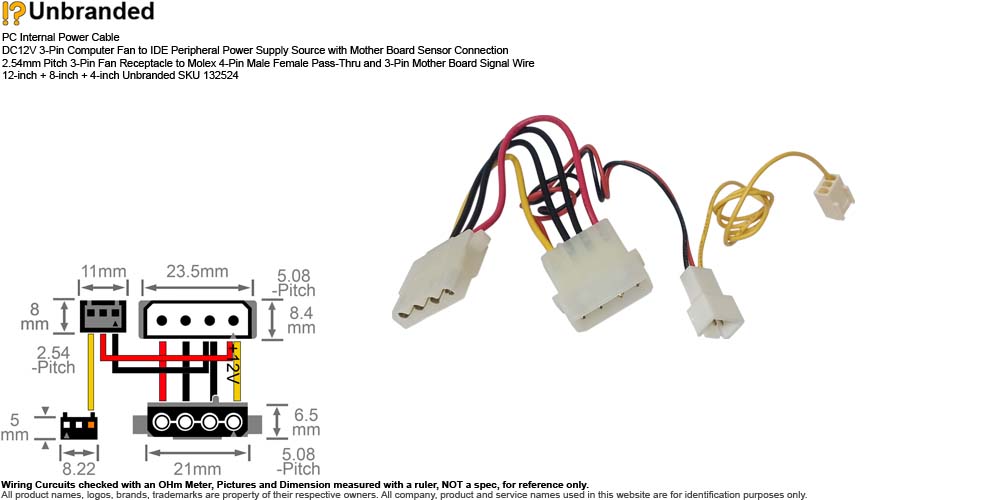
PC Internal Power Cable
DC12V 3-Pin Computer Fan to IDE Peripheral Power Supply Source with
Mother Board Sensor Connection
2.54mm Pitch 3-Pin Fan Receptacle to Molex 4-Pin Male Female Pass-Thru
and 3-Pin Mother Board Signal Wire
12-inch + 8-inch + 4-inch Unbranded SKU 132524
CB-PWI-xxx
Features:
- Description: PC Internal Power
Cable DC12V 3-Pin Computer Fan to IDE Peripheral Power Supply Source
with Mother Board Sensor Connection 2.54mm Pitch 3-Pin Fan
Receptacle to Molex 4-Pin Male Female Pass-Thru and 3-Pin Mother
Board Signal Wire 12-inch + 8-inch + 4-inch Unbranded SKU 132524
- Manufacturer: Not
Specified
- Brand or Distributor: Unbranded
- Model:
(Equivalent & Compatible)
- Connectors:
- Molex KK Variant 2.54-Pitch 3-Pin
3-Conductor Male Receptacle
- Molex KK Variant 2.54-Pitch 3-Pin
1-Conductor Female Plug
- Molex AMP Mate-N-Lok Compatible IDE
Peripheral 5.08-Pitch Female-to-Male Pass-Thru
- Item Length:
- 12-inch: 3-Pin Male Receptacle
to 3-Pin Female Plug
- 8-inch: 3-Pin Male Receptacle
to IDE 4-Pin Male
- 4-inch: IDE 4-Pin Male to
IDE 4-Pin Female
- Weight: 0.6 oz
(estimated shipping weight 3 oz)
- Condition: (Subject
to Availability)
- SKU ______A -
Aged
Open Box, not been used, with signs of cosmetic wear.
- SKU ______N - New
- SKU ______B - Bulk New, seller
repackaged.
- SKU ______E -
Excess
Inventory,
not been used, may have signs of age.
- SKU ______P -
For parts or not working, As-Is. Not eligible for return or refund
- SKU ______O -
Open Box, may have signs of cosmetic wear.
- SKU ______R - Refurbished to
working condition.
- SKU ______U -
Used,
with
signs of cosmetic wear.
- Packaging: Non-retail packaging, in
unprinted box or plastic bag.
-
For use with or pulled from: (for
reference only)
- A 3-Pin fan to 4-pin IDE (Molex)
power adapter is to power a computer case fan directly from the
power supply unit (PSU) rather than thru the mother board.
- Because the fan is powered directly
by the power supply and not the motherboard, the mother board
has no electrical connection to the fan to 'see' if it is spinning.
- If this adapter is connected to CPU
Fan, the BIOS assumes the fan has failed and shows 'CPU Fan Error'
during the POST (Power-On Self-Test). Change the 'CPU Fan Speed'
setting to 'Ignore' under BIOS will tell the motherboard to stop
looking for a signal from the fan.
- Connecting the 3-pin sensor wire to
the mother board will let the computer to 'see' if the fan is spinning.
- Most 3-pin computer cooling fans
share a standardized pinout specified by Intel and AMD allowing them
to be interchangeable across most motherboards. However, some
proprietary systems use different pin layouts that can damage
components.
- Check the
polarity of the connection before use. Seller
will not be held responsible for any damage to systems, parts,
software used in conjunction with, data lost, corrupted resulting
from the use of its products, or any other damages caused by the
purchased items
|